



Logitech
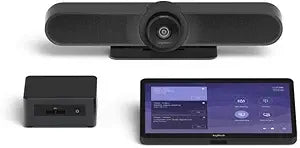
Logitech TAPMUPMSTINT Microsoft Teams Small Room System
The Logitech TAPMUPMSTINT brings one-touch Microsoft Teams conferencing to small meeting rooms with a streamlined all-in-one setup.
$3,850.00*
View on Amazon
✓ In Stock on Amazon.com
*Price sourced from Amazon.com. Last updated:Oct 25, 2026.Price and availability are subject to change — details.
Affiliate Disclosure: As an Amazon Associate, Studio Supplies earns from qualifying purchases made through links on this page, at no additional cost to you. This helps support our editorial team.
Notice a mistake? Let Us Know
Overview
Specifications
Brand
Logitech
Model
TAPMUPMSTINT
Platform Compatibility
Microsoft Teams Rooms
Room Size
Small rooms / huddle spaces
Controller
Logitech Tap touch controller
Frequently Asked Questions
What is included in the Logitech TAPMUPMSTINT system?
The system is a pre-configured small room bundle designed for Microsoft Teams Rooms. It typically includes the Logitech Tap touch controller, a MeetUp all-in-one conference camera and speakerbar, and the required computing hardware to run Microsoft Teams Rooms software.
Does this system work with platforms other than Microsoft Teams?
This particular bundle (TAPMUPMSTINT) is purpose-built and licensed for Microsoft Teams Rooms. It is not designed for use with Zoom, Google Meet, or other conferencing platforms.
What room size is the TAPMUPMSTINT designed for?
It is optimized for small meeting rooms and huddle spaces, typically accommodating up to about six participants.
How do users start a meeting with this system?
The Logitech Tap touch controller provides a one-touch join experience. Users can start scheduled meetings directly from the always-on display or join with a single tap, with no laptop connection required.
Related Products


