

Microsoft
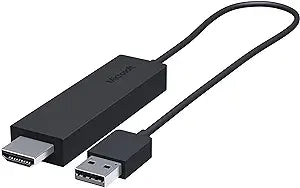
Microsoft CG4-00003 Wireless Display Adapter v1
★★★★★
Seamless Wireless Display ConnectivityThe Microsoft Wireless Display Adapter v1 allows you to effortlessly share content from your tablet, laptop, or smartphone to an HDTV or monitor wirelessly. Perfect for streaming movies, viewing photos, or giving presentations on a larger screen. Key Features...
View price on Amazon
Affiliate Disclosure: Studio Supplies may earn a commission from qualifying purchases made through links on this page, at no additional cost to you. This helps support our editorial team.
Notice a mistake? Let Us Know
Overview
Seamless Wireless Display Connectivity
The Microsoft Wireless Display Adapter v1 allows you to effortlessly share content from your tablet, laptop, or smartphone to an HDTV or monitor wirelessly. Perfect for streaming movies, viewing photos, or giving presentations on a larger screen.
Key Features:
- Stream content to your big screen wirelessly
- Modernize meetings and presentations
- Uses Miracast technology for seamless connectivity
- Easy to connect and mirror your screen
System Requirements:
- Miracast enabled Windows 8.1 tablets/laptops/phones
- Android devices with 4.2.1 and later
- Internet access not required for use
Key Features
See it all on your big screen
Modernize your meetings
Mira cast technology
Easily connect
Specifications
Model
CG4-00003
Wireless Technology
Miracast
Pros & Cons
👍 Pros
- The Microsoft Wireless Display Adapter v1 enables easy projection of content from a device onto a larger screen.
- This adapter utilizes Miracast technology, offering a standardized and widely supported wireless display solution.
- It helps modernize meetings by facilitating seamless sharing of presentations and visuals without cables.
- The adapter is designed for straightforward connection, making it simple to set up and use for various applications.
👎 Cons
- The adapter relies on Miracast technology, which may have compatibility limitations with older devices or operating systems.
- Specific details regarding its maximum wireless range are not provided, potentially limiting its use in larger rooms.
- Power requirements for the adapter are not specified, which could impact its portability or ease of installation.
- Performance may vary depending on the quality of the Wi-Fi connection and the transmitting device's capabilities.
Frequently Asked Questions
What technology does the Microsoft Wireless Display Adapter v1 use for connectivity?
The Microsoft Wireless Display Adapter v1 utilizes Miracast technology, which allows for wireless screen mirroring to a larger display.
Can this adapter be used to share presentations in a professional setting?
Yes, the adapter is designed to modernize meetings by enabling easy screen sharing to your big screen, facilitating presentations.
Is connecting to this adapter a complicated process?
The Microsoft Wireless Display Adapter v1 is designed for easy connection, streamlining the process of projecting your content.
What is the main benefit of using this wireless display adapter?
The main benefit is the ability to see all your content on a big screen wirelessly, enhancing viewing and sharing experiences.
Related Products


