



Microsoft
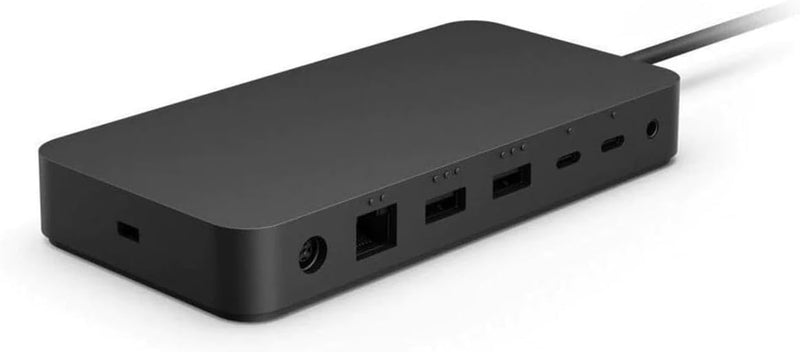
Microsoft Docking Station for Surface Laptop Pro USB-C
USB-C
One USB-C cable turns your Surface into a full workstation — external displays, peripherals, and wired Ethernet included.
$239.50*$299.99Save 20%
View on Amazon
✓ In Stock on Amazon.com
*Price sourced from Amazon.com. Last updated:Oct 23, 2026.Price and availability are subject to change — details.
Affiliate Disclosure: As an Amazon Associate, Studio Supplies earns from qualifying purchases made through links on this page, at no additional cost to you. This helps support our editorial team.
Notice a mistake? Let Us Know
Overview
Key Features
Easy to install
Environment friendly
Specifications
Brand
Microsoft
Color
Black
Hardware Interface
USB, USB Type-C, Ethernet, Thunderbolt
Installation
Plug and Play (no drivers required)
Compatible Devices
Microsoft Surface Laptop, Pro, Go, Book, Studio series
Special Feature
Plug and Play
Frequently Asked Questions
Which Surface devices is this docking station compatible with?
Microsoft lists compatibility with Surface Laptop, Surface Pro, Surface Go, Surface Book, and Surface Studio series devices. Confirm your specific Surface model and generation against the full compatibility list on Microsoft's product page, as connector requirements vary between Surface generations.
What display output options does this docking station provide?
The listing describes USB, USB Type-C, Ethernet, and Thunderbolt interfaces but does not specify the number or type of display output ports (HDMI, DisplayPort, Mini DisplayPort). Verify the specific port configuration against Microsoft's full product specification sheet before purchase if display output count is a primary requirement.
Does the docking station charge my Surface while it's connected?
USB-C and Thunderbolt docking stations in this category typically deliver power delivery to the connected laptop through the same connection used for data and display. Verify the wattage rating in Microsoft's full specification sheet to confirm it provides sufficient power delivery for your specific Surface model's charging requirements.
What does plug-and-play installation mean for this dock?
Plug-and-play means no additional driver installation is required — connecting the dock to your Surface via the USB-C or Thunderbolt cable should immediately activate all connected peripherals and displays. Some display output configurations may require a Windows display mode selection, but no third-party software installation is needed.
What does "environment friendly" mean in the context of this dock's specifications?
The listing notes this as an environment-friendly product without specifying the certification standard (e.g., ENERGY STAR, EPEAT, RoHS compliance). For detailed environmental compliance information, refer to Microsoft's official product page or packaging documentation.
Related Products


