



Microsoft
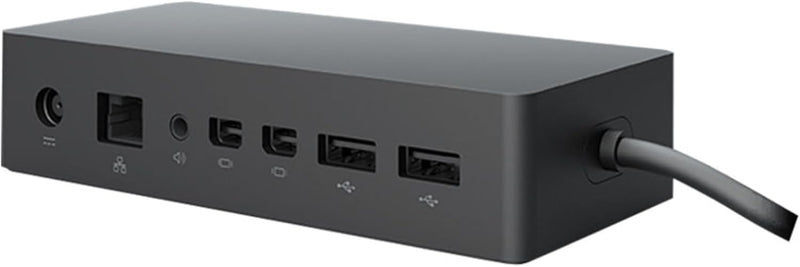
Microsoft PF3-00005 Surface Dock
USB 3.0
Unlock Desktop Productivity with Seamless Connectivity The Microsoft Surface Dock transforms your Surface device into a powerful desktop workstation. Connect to multiple displays, peripherals, and wired networks with ease, enhancing your productivity. Specifications Compatibility: Surface Pro 3...
$86.99*$88.90Save 2%
View on Amazon
✓ In Stock on Amazon.com
*Price sourced from Amazon.com. Last updated:Oct 23, 2026.Price and availability are subject to change — details.
Affiliate Disclosure: As an Amazon Associate, Studio Supplies earns from qualifying purchases made through links on this page, at no additional cost to you. This helps support our editorial team.
Notice a mistake? Let Us Know
Overview
Unlock Desktop Productivity with Seamless Connectivity
The Microsoft Surface Dock transforms your Surface device into a powerful desktop workstation. Connect to multiple displays, peripherals, and wired networks with ease, enhancing your productivity.Specifications
- Compatibility: Surface Pro 3, Surface Pro 4, Surface Book
- Ports: 4 USB 3.0, 2 Mini Display Ports, 1 Gigabit Ethernet, 1 Audio Out
- Connectivity: Ethernet, USB 3.0
- Hardware Interface: Ethernet, USB 3.0
- Color: Black
Key Features
2x Mini Display Ports, 1x Gigabit Ethernet Port
4 USB 3.0 ports, 1x Audio out port
Magnetic Surface Connect Cable
High-Speed Data Transfering
Compatible With Surface Pro 3, Surface Pro 4 and Surface Book
Specifications
Model
PF3-00005
Video Ports
2x Mini Display Ports
Network Port
1x Gigabit Ethernet Port
USB Ports
4x USB 3.0 ports
Audio Port
1x Audio out port
Connection Type
Magnetic Surface Connect Cable
Compatible Devices
Surface Pro 3, Surface Pro 4, Surface Book
Data Transfer Speed
High-Speed
Frequently Asked Questions
Which Surface devices are compatible with the Microsoft PF3-00005 Surface Dock?
This Surface Dock is specifically compatible with the Surface Pro 3, Surface Pro 4, and the original Surface Book, providing expanded connectivity for these models.
How many external displays can I connect using this Surface Dock?
The Microsoft Surface Dock features two Mini Display Ports, allowing users to connect and extend their desktop across two external monitors for enhanced productivity.
Does this dock provide a wired internet connection?
Yes, the Surface Dock includes a Gigabit Ethernet port, which offers a stable and high-speed wired network connection for your compatible Surface device.
What types of USB ports are available on this docking station?
This docking station is equipped with four USB 3.0 ports, enabling high-speed data transfer for various peripherals such as external hard drives, keyboards, and mice.
How does the Surface Dock connect to the Surface device?
The Surface Dock connects to your compatible Surface device via a magnetic Surface Connect Cable, ensuring a secure and easy attachment.
Can I connect external speakers or headphones to this dock?
Yes, the dock includes a dedicated Audio out port, which allows you to connect external speakers, headphones, or other audio output devices.
Related Products


