

Microsoft
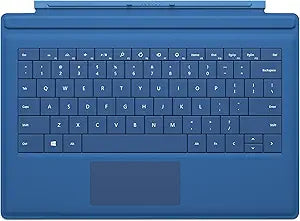
Microsoft RD2-00107 Surface Pro 3 Cyan Type Cover
★★★★★
Transform Your Surface Pro 3 with the Microsoft Type CoverThe Microsoft Surface Pro 3 Type Cover instantly turns your Surface Pro 3 into a premium laptop. Featuring a slim design, backlit keys, and enhanced magnetic stability, this Type Cover offers a comfortable and efficient typing experience, ...
View price on Amazon
Affiliate Disclosure: Studio Supplies may earn a commission from qualifying purchases made through links on this page, at no additional cost to you. This helps support our editorial team.
Notice a mistake? Let Us Know
Overview
Transform Your Surface Pro 3 with the Microsoft Type Cover
The Microsoft Surface Pro 3 Type Cover instantly turns your Surface Pro 3 into a premium laptop. Featuring a slim design, backlit keys, and enhanced magnetic stability, this Type Cover offers a comfortable and efficient typing experience, whether you're at your desk or on the go.
Specifications
- Compatibility: Surface Pro 3
- Keyboard Layout: QWERTY US keyboard
- Keys: Full row of Function keys (F1-F12), Windows shortcut keys, and media controls
- Touchpad: Built-in touchpad
- Features: Backlit keys, magnetic stability, automatic key disabling when folded back
- Color: Cyan
- Functionality: Doubles as a protective cover
Key Features
Full keyboard capabilities - Thin and comfortable to use, Surface Pro 3 Type Cover has the speed and ability of a classic laptop keyboard. Its keys are backlit, making it great for all-nighters. And it comes in eye-catching colours.
Loaded and capable - Surface Pro 3 Type Cover features a QWERTY US keyboard, a full row of Function keys (F1-F12), Windows shortcut keys, and media controls. Take control of the cursor with your fingertip using the built-in touchpad.
Doubles as protection - When folded back, Surface Pro 3 Type Cover's keys disable to prevent unwanted typing while you're using your Surface 3. Flip Surface Pro 3 Type Cover closed to turn the display off and shield the screen from bumps and scratches
Tablet to laptop in a snap - Just add Surface Pro 3 Type Cover to your Surface Pro 3 to turn it into a highly versatile laptop. One of the thinnest mechanical keyboards out there, Surface Pro 3 Type Cover features everything you need from a keyboard.
It's also super stable, making it great for typing on your lap-or any surface really. And it's incredibly easy to slip on and take off.
Specifications
Keyboard Type
Type Cover
Compatibility
Surface Pro 3
Key Layout
QWERTY US
Special Keys
Function keys (F1-F12), Windows shortcut keys, Media controls
Pointing Device
Built-in touchpad
Key Backlight
Yes
Protection
Screen shield when closed
Pros & Cons
👍 Pros
- Offers full keyboard capabilities, transforming the Surface Pro 3 into a versatile laptop experience.
- Features backlit keys, making it suitable for use in low-light environments or during late-night work sessions.
- Comes in eye-catching colors, allowing for personalization and a touch of style.
- Includes a full row of Function keys (F1-F12), Windows shortcut keys, and media controls for enhanced productivity.
- Equipped with a built-in touchpad, providing precise cursor control with fingertip navigation.
- Doubles as a protective cover for the Surface Pro 3, shielding the screen from bumps and scratches when closed.
- Features a stable design that is suitable for typing on a lap or various other surfaces, enhancing usability.
👎 Cons
- Specifically designed for the Surface Pro 3, meaning it is not compatible with other Surface models or tablets.
- While offering full keyboard capabilities, the "thin and comfortable" design might compromise on key travel compared to traditional laptop keyboards.
- The "eye-catching colors" might not appeal to all users, particularly those preferring more subtle or professional aesthetics.
- The disabling of keys when folded back is a safety feature, but it might require users to consciously flip it open to resume typing after tablet use.
- As an accessory, it adds to the overall cost of the Surface Pro 3 setup, which may be a consideration for budget-conscious buyers.
Frequently Asked Questions
Does this Type Cover offer a full keyboard experience?
Yes, the Surface Pro 3 Type Cover provides full keyboard capabilities, including a QWERTY US layout and a full row of Function keys.
Is the keyboard backlit for use in different lighting conditions?
Yes, the keys on the Surface Pro 3 Type Cover are backlit, making it suitable for use in various lighting environments, including low light.
How does this accessory enhance the functionality of the Surface Pro 3?
It transforms the Surface Pro 3 into a highly versatile laptop by providing a mechanical keyboard and a built-in touchpad, making it suitable for typing on a lap or desk.
Does the Type Cover offer any protective features for the Surface Pro 3?
Yes, when flipped closed, the Surface Pro 3 Type Cover turns off the display and shields the screen from bumps and scratches.
Is a touchpad included with this Type Cover?
Yes, the Surface Pro 3 Type Cover features a built-in touchpad, allowing for precise cursor control with your fingertip.
Related Products


