

Monoprice
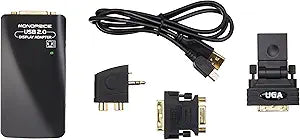
Monoprice 106039 USB to DVI Display Adapter
★★★★★
USB 2.0
Extend Your Display with Monoprice USB 2.0 to DVI Adapter The Monoprice USB 2.0 to DVI Display Adapter allows you to connect an additional monitor to your computer through a USB port. Configure the display to mirror your main screen or extend your desktop, enhancing multitasking and productivity....
Check availability
Affiliate Disclosure: Studio Supplies may earn a commission from qualifying purchases made through links on this page, at no additional cost to you. This helps support our editorial team.
Notice a mistake? Let Us Know
Overview
Extend Your Display with Monoprice USB 2.0 to DVI Adapter
The Monoprice USB 2.0 to DVI Display Adapter allows you to connect an additional monitor to your computer through a USB port. Configure the display to mirror your main screen or extend your desktop, enhancing multitasking and productivity.
Specifications:
- Brand: Monoprice
- Model: 106039
- Interface: USB 2.0 to DVI
- Maximum Resolution: 1280x1024/1400x1050
- Functionality: Clone or extend display
Key Features
The USB 2.0 Graphic Adapter allows you to connect an extra monitor to your desktop PC or laptop's USB port
The connected monitor can be configured to either clone your primary screen
The USB 2.0 Graphic Adapter driver used to control the extra screen uses very little computer resource
Specifications
Product Type
USB to DVI Display Adapter
USB Standard
USB 2.0
Video Output
DVI
Display Modes
Clone, Extend
Brand
Monoprice
Model Number
106039
Pros & Cons
👍 Pros
- Expands display capabilities by allowing an extra monitor connection via a standard USB port.
- Offers flexible display modes, enabling users to either clone their primary screen or extend their desktop.
- Utilizes minimal computer resources for its driver, ensuring efficient operation without significantly impacting system performance.
- Provides a straightforward solution for adding a DVI display to systems without an available DVI output.
- The adapter is compatible with USB 2.0, making it widely usable with many existing desktop and laptop PCs.
👎 Cons
- As a USB 2.0 device, its bandwidth may limit the performance or resolution capabilities compared to more modern USB 3.0 or dedicated graphics card outputs.
- This adapter specifically outputs to DVI, meaning users with HDMI or DisplayPort monitors will need additional converters.
- The functionality is tied to the performance of the host computer's USB port, which might vary.
- It requires driver installation to function, which adds a step before immediate plug-and-play use.
- Limited to connecting a single additional monitor per adapter, potentially requiring multiple units for multi-monitor setups beyond two screens.
Frequently Asked Questions
Can this adapter extend my desktop across multiple screens, or only duplicate my main display?
This Monoprice USB 2.0 Graphic Adapter can be configured to either clone your primary screen or extend your desktop, offering versatile display options.
What USB standard does this display adapter use?
This adapter connects via a USB 2.0 port, making it compatible with a wide range of desktop PCs and laptops.
Will this adapter consume a lot of my computer's processing power?
The USB 2.0 Graphic Adapter driver is designed to use very little computer resource, minimizing impact on system performance.
Can I connect more than one extra monitor using this single adapter?
This adapter allows you to connect an "extra monitor" to your USB port, suggesting it supports one additional display per unit.
What type of video input does my monitor need to have for this adapter?
This Monoprice adapter outputs to DVI, so your monitor will need a DVI input for direct connection.
Related Products


