



Monoprice
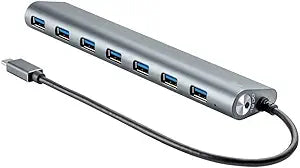
Monoprice 114909 7-Port USB-C Hub - Aluminum
★★★★★
USB-C
Seven USB ports from a single USB-C connection turn your single-port MacBook or Chromebook into a fully connected workstation without driver installation.
$44.79*
View on Amazon
✓ In Stock on Amazon.com
*Price sourced from Amazon.com. Last updated:Jun 04, 2026.Price and availability are subject to change.
Affiliate Disclosure: Studio Supplies may earn a commission from qualifying purchases made through links on this page, at no additional cost to you. This helps support our editorial team.
Notice a mistake? Let Us Know
Overview
Key Features
Plug any play - no drivers required.
Plug any play - no drivers required.
Plug any play - no drivers required.
Specifications
Number of Ports
7
Host Connection
USB-C
Housing Material
Aluminum
Pros & Cons
👍 Pros
- Seven ports from a single USB-C connection solves the acute port shortage on modern single-port ultrabooks without requiring a dock or power adapter.
- Plug-and-play operation with zero driver installation means the hub works immediately on macOS, ChromeOS, and Windows without IT involvement or software management.
- Aluminum construction matches the aesthetic of premium ultrabooks and provides better heat dissipation under load than plastic-bodied hubs.
- Compact form factor makes this practical for travel, unlike multi-port desktop docks that require desk space and separate power supplies.
- Broad device compatibility — works with Apple MacBook, Google Chromebook, and any USB-C host — removes the need for platform-specific accessories.
👎 Cons
- All seven ports share a single USB-C upstream connection's bandwidth ceiling — simultaneous high-speed transfers across multiple ports will see degraded individual throughput.
- No Power Delivery passthrough port documented — the hub cannot charge your host laptop while in use, forcing users to disconnect to charge or use a separate charger.
- USB-A ports on the hub cannot connect to other USB-C peripherals without additional adapters — the hub adds legacy USB-A ports, not USB-C ports, which may not address the connectivity needs of users with modern USB-C peripherals.
- No HDMI or DisplayPort output — users who need display expansion alongside USB expansion require a different, more capable hub or dock.
- Bus-powered design means power-hungry accessories (external hard drives, certain audio interfaces) may require a self-powered hub or powered dock for reliable operation.
Frequently Asked Questions
What USB generation does this hub support — USB 3.0, USB 2.0, or mixed?
The hub is described as supporting SuperSpeed transfer rates, indicating USB 3.0 (5Gbps) capability. However, all seven ports sharing a single USB-C upstream connection means total aggregate bandwidth is capped at the host controller's USB 3.0 ceiling — bandwidth is shared, not dedicated, across all active ports simultaneously.
Does this hub require drivers or software installation to function?
No — this hub is plug-and-play with no drivers required. It operates as a standard USB hub recognized natively by macOS, ChromeOS, and Windows without additional software installation.
Can this hub power connected devices, or does it only provide data connectivity?
The product description does not specify a dedicated power delivery (PD) passthrough port. Assume it provides bus-powered USB power delivery only (typically 900mA per USB 3.0 port under the standard), which is sufficient for mice, keyboards, flash drives, and most mobile devices but may not fast-charge tablets or laptops reliably.
Is this hub compatible with iPad Pro, Surface Pro, or other USB-C tablets?
USB-C hubs work with any device that exposes a standard USB-C data port. USB-C iPads, Surface Pros, and Android tablets with USB-C connections should recognize the hub as a standard USB device. Confirm your specific tablet supports USB-C data accessories if connectivity is a priority use case.
Does connecting all seven ports simultaneously reduce individual port performance?
Yes — USB hub bandwidth is shared across all active ports from a single upstream connection. Simultaneous transfers on multiple high-speed ports (e.g., multiple USB 3.0 flash drives) will divide available bandwidth. For sequential transfers on a single port at a time, full USB 3.0 speeds are available.
Related Products


