



Monoprice
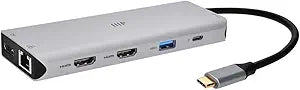
Monoprice 13-in-1 Triple Monitor Docking Station 4K 100W PD
4K1080p100WUSB-CDisplayPort
Expand a single USB-C port into 13 connections with triple 4K monitor support and 100W power delivery pass-through.
$58.98*$72.68Save 18%
View on Amazon
✓ In Stock on Amazon.com
*Price sourced from Amazon.com. Last updated:Oct 23, 2026.Price and availability are subject to change — details.
Affiliate Disclosure: As an Amazon Associate, Studio Supplies earns from qualifying purchases made through links on this page, at no additional cost to you. This helps support our editorial team.
Notice a mistake? Let Us Know
Overview
Key Features
Massive expandability - turn one USB-C port into 13 ports that fulfill all your workstation needs, include adding extra monitors, mouse, keyboard, memory drives, etc.
Triple high-resolution displays & faster data transfer - connect your laptop up to 2 HDMI & 1 DisplayPort external monitors simultaneously, enjoy fast 5Gbps USB transfer speed, and Gigabit Ethernet
Ease of Use & wide compatibility - Plug-and-play (no driver or setup necessary), works with Windows, MacOS, Thunderbolt (MacOS only supports SST modes)
USB-C supports up to 100W Power Delivery pass-through charging.
Max resolution for single external display: HDMI 1: 4K@60Hz HDMI 2: 4K@30Hz DisplayPort: 4K@60Hz -Max resolutions for dual external displays: 4K@30Hz + 1080p@60Hz -Max resolutions for triple external displays: 4K@30Hz + 1080p@60Hz + 1080p@60Hz.
Specifications
Brand
Monoprice
Model
13-in-1 Dual-HDMI + DP MST Triple Monitor Docking Station
Total Ports
13
Video Outputs
2x HDMI, 1x DisplayPort
Max Single Display Resolution
4K@60Hz (HDMI 1 or DP) / 4K@30Hz (HDMI 2)
Max Dual Display Resolution
4K@30Hz + 1080p@60Hz
Max Triple Display Resolution
4K@30Hz + 1080p@60Hz + 1080p@60Hz
USB Data Transfer Speed
Up to 5Gbps
Power Delivery
Up to 100W pass-through (USB-C)
Ethernet
Gigabit Ethernet
Compatibility
Windows, macOS, Thunderbolt (macOS SST only)
Setup
Plug-and-play, no drivers required
Frequently Asked Questions
Can I run three external monitors at 4K resolution simultaneously?
Not all three at full 4K. In triple-display mode, the maximum supported configuration is one monitor at 4K@30Hz and two at 1080p@60Hz. A single external display can run at up to 4K@60Hz via HDMI 1 or DisplayPort.
Does this docking station work with macOS?
Yes, it is plug-and-play on macOS, but macOS only supports SST (Single-Stream Transport) modes, which means MST-based multi-monitor extended desktop configurations are limited compared to Windows.
Do I need to install any drivers?
No, the docking station is plug-and-play and requires no driver installation on Windows or macOS.
Does it charge my laptop while in use?
Yes, the USB-C connection supports up to 100W Power Delivery pass-through charging, so your laptop charges while connected to the dock.
What USB transfer speed does the dock support?
The USB ports on the dock support data transfer speeds up to 5Gbps.
Related Products


