

Monoprice
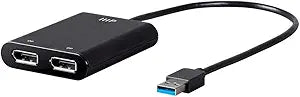
Monoprice 130532 USB 3.0 to Dual DisplayPort 4K 60Hz Adapter
Unlock Multitasking Potential with Dual 4K DisplaysIntroducing the Monoprice USB 3.0 to Dual 4K @60Hz DisplayPort Video Adapter. Expand your workstation with seamless dual-monitor support, delivering crystal-clear visuals at high refresh rates. Compatible with USB 2.0 for broader device support. ...
View price on Amazon
Affiliate Disclosure: As an Amazon Associate, Studio Supplies earns from qualifying purchases made through links on this page, at no additional cost to you. This helps support our editorial team.
Notice a mistake? Let Us Know
Overview
Unlock Multitasking Potential with Dual 4K Displays
Introducing the Monoprice USB 3.0 to Dual 4K @60Hz DisplayPort Video Adapter. Expand your workstation with seamless dual-monitor support, delivering crystal-clear visuals at high refresh rates. Compatible with USB 2.0 for broader device support.
Specifications:
- Brand: Monoprice
- Model: 130532
- Type: USB 3.0 to Dual DisplayPort Video Adapter
- Maximum Resolution: Dual 4K @ 60Hz
- USB Compatibility: USB 3.0 (Backwards compatible with USB 2.0)
- Color: Black
- Device Support: DisplayPort Enabled Devices
Specifications
Product Type
USB 3.0 to Dual DisplayPort Adapter
USB Standard
USB 3.0
Output Ports
Dual DisplayPort
Max Resolution
4K
Max Refresh Rate
60Hz
Frequently Asked Questions
What resolution and refresh rate does this Monoprice adapter support?
This adapter supports dual DisplayPort outputs at 4K resolution with a 60Hz refresh rate.
What type of USB port is required for this adapter to function?
It requires a USB 3.0 port to achieve optimal performance and support dual 4K displays.
Can this adapter be used with HDMI monitors?
This adapter provides Dual DisplayPort outputs, so direct connection to HDMI monitors would require additional DisplayPort to HDMI converters.
Is this adapter suitable for extending my desktop across two screens?
Yes, it is designed to provide dual DisplayPort outputs, making it ideal for extending your desktop across multiple high-resolution monitors.
Do I need to install any drivers for this adapter?
While not explicitly stated in the features, USB display adapters often require specific drivers to enable full functionality.
Related Products


