



Monoprice
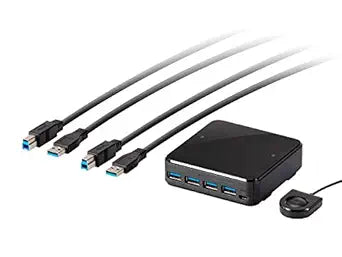
Monoprice 138298 2x4 USB 3.1 Peripheral Sharing Switch
USB 3.1
Share four USB devices between two computers instantly with USB 3.1 speeds up to 5 Gbps and no drivers required.
$74.95*
Check availability
*Price sourced from Amazon.com. Last updated:Oct 25, 2026.Price and availability are subject to change — details.
Affiliate Disclosure: As an Amazon Associate, Studio Supplies earns from qualifying purchases made through links on this page, at no additional cost to you. This helps support our editorial team.
Notice a mistake? Let Us Know
Overview
Key Features
Simple port selection using the remote port selector.
Usb 3.1 Gen1 compatible, supporting data transfer Rates of up to 5 gbps.
Leds indicates which computer is Active. Bus-powered, no external power supply needed.
Plug and play, no drivers or external power adapter needed.
Multiplatform support Windows, Mac OS x, and Linux.
Specifications
Brand
Monoprice
Model
138298
USB Standard
USB 3.1 Gen1
Max Data Transfer Rate
5 Gbps
USB Downstream Ports
4
Computers Supported
2
Power
Bus-powered (no external adapter)
Switching Method
Remote port selector
Platform Compatibility
Windows, macOS, Linux
Installation
Plug and play, no drivers required
Frequently Asked Questions
How do I switch which computer controls the USB devices?
You use the included remote port selector button to toggle control between the two connected computers. LED indicators show which computer is currently active.
Does this switch support USB 2.0 devices as well?
Yes, it is backward compatible with USB 2.0 and USB 1.1 devices, though they will operate at their native speeds rather than USB 3.1 speeds.
Does the switch require its own power supply?
No, the switch is bus-powered through the USB connections to your computers, so no external power adapter is needed.
Can I use this with a Mac and a Windows PC at the same time?
Yes, it supports Windows, macOS, and Linux, so you can connect two computers running different operating systems simultaneously.
Does switching computers disconnect and reconnect the USB devices?
Yes, when you switch ports the connected USB devices will briefly disconnect from one computer and reconnect to the other, similar to physically unplugging and replugging them.
Related Products


