

MSI
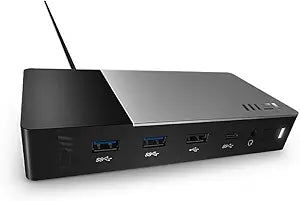
MSI 1P151E001 Black USB-C Docking Station Gen 2
USB-CUSB 3.2USB 2.0
Expand Your Connectivity with a Versatile DockThe MSI Black USB-C Docking Station (2nd Gen) provides a comprehensive solution for expanding your notebook's connectivity. Connect multiple devices and monitors through a single USB-C connection. Connectivity Technology: Wired Host Interfa...
$129.99*$274.84Save 52%
View on Amazon
✓ In Stock on Amazon.com
*Price sourced from Amazon.com. Last updated:Oct 23, 2026.Price and availability are subject to change — details.
Affiliate Disclosure: As an Amazon Associate, Studio Supplies earns from qualifying purchases made through links on this page, at no additional cost to you. This helps support our editorial team.
Notice a mistake? Let Us Know
Overview
Expand Your Connectivity with a Versatile Dock
The MSI Black USB-C Docking Station (2nd Gen) provides a comprehensive solution for expanding your notebook's connectivity. Connect multiple devices and monitors through a single USB-C connection.
- Connectivity Technology: Wired
- Host Interface: USB 3.2 (Gen 2) Type C
- USB Ports: 5 (1 x USB 2.0)
- Device Supported: Notebook/Monitor
Key Features
Connectivity Technology: Wired
Device Supported: Notebook/Monitor
Host Interface: USB 3.2 (Gen 2) Type C
Total Number of USB Ports: 5
Number of USB 2.0 Ports: 1
Specifications
Connectivity Technology
Wired
Device Supported
Notebook/Monitor
Host Interface
USB 3.2 (Gen 2) Type C
Total Number of USB Ports
5
Number of USB 2.0 Ports
1
Color
Black
Frequently Asked Questions
What type of host interface does the MSI USB-C Docking Station Gen 2 use?
The MSI 1P151E001 docking station connects to your host device using a USB 3.2 (Gen 2) Type C interface.
How many USB ports are available on this docking station?
This docking station provides a total of 5 USB ports for connecting various peripherals.
Is there a USB 2.0 port on this docking station?
Yes, the MSI docking station includes 1 USB 2.0 port, which can be useful for connecting compatible devices.
What types of devices are supported by this docking station?
This docking station is designed to support both notebooks and monitors, expanding their connectivity options.
Does the description specify if the docking station provides power delivery to a laptop?
The provided features do not specify whether this MSI docking station offers power delivery capabilities to a connected notebook.
Related Products


