

NVIDIA
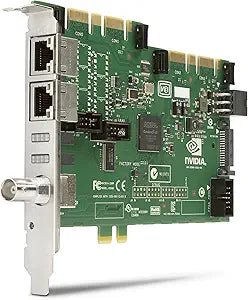
NVIDIA G5K57AA Add-On Interface Board Quadro Sync
Unleash the Power of Multi-Display SynchronizationIntroducing the NVIDIA Add-On Interface Board G5K57AA, engineered to elevate the capabilities of your HP Z Workstation. This board empowers you to synchronize select NVIDIA Quadro GPU video outputs, enabling support for up to 12 displays or projec...
Check availability
Affiliate Disclosure: As an Amazon Associate, Studio Supplies earns from qualifying purchases made through links on this page, at no additional cost to you. This helps support our editorial team.
Notice a mistake? Let Us Know
Overview
Unleash the Power of Multi-Display Synchronization
Introducing the NVIDIA Add-On Interface Board G5K57AA, engineered to elevate the capabilities of your HP Z Workstation. This board empowers you to synchronize select NVIDIA Quadro GPU video outputs, enabling support for up to 12 displays or projectors. Experience a new dimension of flexibility and scalability for creating ultra-high-resolution display walls and advanced visualization clusters.
Specifications:
- Brand: NVIDIA
- Model: G5K57AA
- Compatibility: Designed for select NVIDIA Quadro GPUs in HP Z Workstations
- Functionality: Synchronizes video outputs
- Maximum Displays Supported: Up to 12 displays or projectors
- Application: Ideal for ultra-high-resolution display walls and visualization clusters
Key Features
Simplify your deployments
Enable Mosaic
Support Windows-based visualization clusters
Specifications
Product Type
Add-On Interface Board
Function
Quadro Sync
Supported Technology
Mosaic
Supported OS
Windows-based visualization clusters
Frequently Asked Questions
What is the primary purpose of the NVIDIA G5K57AA Add-On Interface Board Quadro Sync?
This interface board is designed to simplify deployments and enhance the capabilities of NVIDIA Quadro graphics cards, particularly for professional visualization and cluster environments.
What specific features does this board enable?
It enables NVIDIA Mosaic technology for advanced multi-display setups and supports Windows-based visualization clusters.
Is this a graphics card on its own?
No, this is an "Add-On Interface Board," which means it works in conjunction with a compatible NVIDIA Quadro graphics card to expand its functionalities.
Will this improve my gaming performance?
This board is specifically designed for professional visualization and cluster applications, not for enhancing gaming performance.
What kind of operating systems does this board support?
The board supports Windows-based visualization clusters, indicating its compatibility with Windows operating environments for specialized tasks.
Related Products


