



SABRENT
SABRENT NVMe SSD Enclosure and Multi-Port USB-C Hub Kit
A two-piece kit that turns a single USB-C port into fast NVMe storage, 4K HDMI output, 90W charging, and three USB-A ports
Check availability
Affiliate Disclosure: As an Amazon Associate, Studio Supplies earns from qualifying purchases made through links on this page, at no additional cost to you. This helps support our editorial team.
Notice a mistake? Let Us Know
Overview
Key Features
Mobile-workstation kit: USB-C NVMe M.2 SSD enclosure plus a 90W multi-port USB-C hub
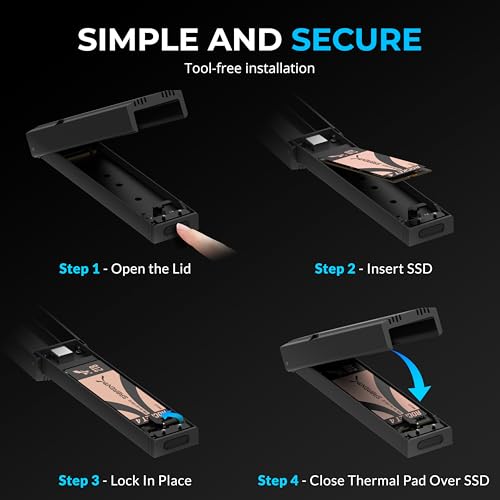
NVMe enclosure: tool-free M.2 PCIe SSD case (2230-2280), 10Gbps USB 3.2 Gen 2, aluminum cooling
USB-C hub: 90W Power Delivery, 4K 60Hz HDMI output, 3 USB-A ports, aluminum body
Turn any USB-C laptop into a workstation: fast external storage plus display, power, and USB expansion
Backed by SABRENT - compatible with MacBook, Windows laptops, and other USB-C devices
Specifications
Brand
SABRENT
Kit Contents
USB-C NVMe M.2 SSD enclosure and 90W multi-port USB-C hub
Enclosure Interface
USB 3.2 Gen 2, up to 10Gbps
Supported Drives
M.2 PCIe NVMe SSD
Supported Sizes
2230 to 2280
Installation
Tool-free
Enclosure Housing
Aluminum with cooling
Hub Power Delivery
90W
Hub Video Output
4K 60Hz HDMI
Hub USB-A Ports
3
Hub Body
Aluminum
Compatibility
MacBook, Windows laptops, other USB-C devices
Frequently Asked Questions
Does this kit include an SSD, or do I need to buy one separately?
You need to supply your own drive. The enclosure ships empty and accepts an M.2 PCIe NVMe SSD in the 2230 to 2280 size range.
How fast is the enclosure's connection to my laptop?
It uses USB 3.2 Gen 2 for up to 10Gbps. That covers most everyday external storage needs, though it won't reach a PCIe Gen 4 drive's peak internal speed.
Can the hub charge my laptop while I use the storage and ports?
Yes. The hub offers 90W Power Delivery pass-through, enough to keep many USB-C laptops charged while HDMI, USB-A, and the enclosure are in use.
What kind of external display can the hub drive?
The hub outputs a single 4K display at 60Hz over HDMI. It's designed for one monitor rather than a multi-display arrangement.
Do I need any tools to install a drive in the enclosure?
No. The enclosure is tool-free, so you can insert or swap a compatible M.2 PCIe NVMe SSD without a screwdriver.
Will this work with both a MacBook and a Windows laptop?
SABRENT lists compatibility with MacBook, Windows laptops, and other USB-C devices, so it is intended to work across both platforms.
Related Products


