



Panasonic
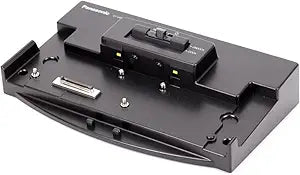
Panasonic CF-VEB191AU Desktop Port Replicator
One-cable docking restores full peripheral connectivity to your Panasonic CF-series device without dismantling your desk setup.
View price on Amazon
Affiliate Disclosure: As an Amazon Associate, Studio Supplies earns from qualifying purchases made through links on this page, at no additional cost to you. This helps support our editorial team.
Notice a mistake? Let Us Know
Overview
Specifications
Brand
Panasonic
Model
CF-VEB191AU
Type
Desktop Port Replicator
Compatibility
Panasonic CF-series (model-specific)
Connector Type
Proprietary CF-series dock interface
Frequently Asked Questions
Which Panasonic devices is the CF-VEB191AU compatible with?
The CF-VEB191AU is designed specifically for Panasonic CF-series devices (Toughbook line). The CF-VEB prefix indicates compatibility with a specific CF-series generation — verify your Panasonic laptop model against Panasonic's compatibility matrix before purchasing, as port replicators in the CF lineup are model-specific and not universally interchangeable.
What is the primary workflow advantage of a desktop port replicator versus plugging peripherals in directly?
A port replicator consolidates all peripheral connections — monitor, keyboard, mouse, network, and storage — into a single proprietary dock connector on the CF-VEB191AU. This means the Panasonic device docks and undocks with a single action, preserving all peripheral connections at the desk while the device itself remains fully portable for fieldwork.
Does the CF-VEB191AU require driver installation on the host Panasonic device?
Panasonic desktop port replicators in the CF series typically rely on the host device's existing hardware — they pass through the laptop's own video, USB, and network controllers rather than adding independent hardware. Driver requirements depend on the specific port types included; check Panasonic's support documentation for the CF-VEB191AU for OS-specific guidance.
Can the CF-VEB191AU be used with non-Panasonic laptops?
No. The dock connector is proprietary to the Panasonic CF series. The CF-VEB191AU uses a vendor-specific interface that physically and electrically matches only compatible Panasonic models. It is not a universal USB-C or Thunderbolt dock and cannot be adapted for use with other brands.
Related Products


