

QNAP
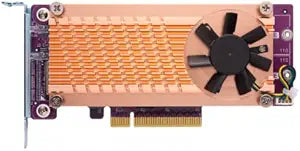
QNAP QM2-2P-244A Dual M.2 PCIe SSD Expansion Card
PCIe Gen2
Expand Your Storage Capabilities with QNAP QM2-2P-244A The QNAP QM2-2P-244A is a dual M.2 PCIe SSD expansion card that allows you to add high-speed storage to your compatible QNAP NAS. Supporting both 22110 and 2280 form factors, this card provides a flexible and efficient solution for boosting y...
$123.00*
Check availability
*Price sourced from Amazon.com. Last updated:Aug 28, 2026.Price and availability are subject to change — details.
Affiliate Disclosure: As an Amazon Associate, Studio Supplies earns from qualifying purchases made through links on this page, at no additional cost to you. This helps support our editorial team.
Notice a mistake? Let Us Know
Overview
Expand Your Storage Capabilities with QNAP QM2-2P-244A
The QNAP QM2-2P-244A is a dual M.2 PCIe SSD expansion card that allows you to add high-speed storage to your compatible QNAP NAS. Supporting both 22110 and 2280 form factors, this card provides a flexible and efficient solution for boosting your NAS performance.
Specifications:
- Connectors: 2x M.2 22110/2280 PCIe (Gen2 x4) NVMe SSD slots
- PCIe and Lanes: PCIe Gen2 x 4
- Bracket: Low-profile pre-loaded, low-profile flat and Full-height bundled
Key Features
Connector: 2 x M. 2 2280 PCIe NVMe SSD slots; 1x 10Gbase-T port
Pcie and lanes: PCIe Gen2 x 4
Bracket: low-profile Pre-loaded, low-profile flat and Full-height are bundled. * M. 2 SSDs are not included as standard
Specifications
Connector Type
2 x M.2 2280 PCIe NVMe SSD slots, 1x 10Gbase-T port
PCIe Interface
PCIe Gen2 x 4
Included Brackets
Low-profile Pre-loaded, Low-profile flat, Full-height
Frequently Asked Questions
What types of connectors are on the QNAP QM2-2P-244A expansion card?
The QNAP QM2-2P-244A features two M.2 2280 PCIe NVMe SSD slots and one 10Gbase-T port for high-speed networking.
What PCIe generation and lane configuration does this expansion card use?
This expansion card utilizes PCIe Gen2 x 4 lanes for its connectivity and data transfer.
Does the expansion card come with M.2 SSDs included?
No, M.2 SSDs are not included as standard with the QNAP QM2-2P-244A expansion card and must be purchased separately.
What kind of brackets are included for installation?
The card comes with a low-profile bracket pre-loaded, and also includes additional low-profile flat and full-height brackets for versatile installation in different cases.
What is the benefit of the 10Gbase-T port on this card?
The 10Gbase-T port provides high-speed 10 Gigabit Ethernet connectivity, which is beneficial for fast network transfers and demanding network applications.
Is this card compatible with all types of M.2 SSDs?
This card supports M.2 2280 PCIe NVMe SSDs, so users should ensure their SSDs match this specification.
Related Products


