



TukeSM
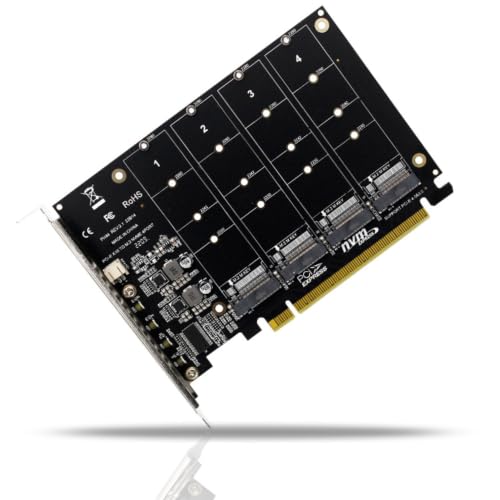
TukeSM PCIe x16 to Quad NVMe M.2 SSD Expansion Adapter Card
Turn one PCIe x16 slot into a home for up to four NVMe M.2 SSDs when your motherboard supports lane bifurcation
$39.62*
View on Amazon
✓ In Stock on Amazon.com
*Price sourced from Amazon.com. Last updated:Oct 08, 2026.Price and availability are subject to change — details.
Affiliate Disclosure: As an Amazon Associate, Studio Supplies earns from qualifying purchases made through links on this page, at no additional cost to you. This helps support our editorial team.
Notice a mistake? Let Us Know
Overview
Key Features
Data Transmission Speed: 480 Length: 12x14.3x10.2cm Branch Connector Quantity: One to Four, Packing List: Carton Packaging, Type: Transfer Card
Instructions for use: Note: Returns and exchanges are not supported after purchase! 1. The main board must support the main board to support the PCI-E split function, and can set the PCI-E X4X4X4 or 4X4 mode; the main board supports the PCI-E RAID function; ASUS main board supports the function of HyperM.2X16. Charging card; different board main PCI-E split channels have different numbers. Some main board PCI-E RAID is X8 + X4 + X4. This main board 4bit M.2 card can only support 3 M.2 SSDs or devices.
The 2-bit M.2 card can only support 1 M.2 SSD or device. If you want to use this product normally, please select the main board correctly; many main boards are channels that share PCI-E. Make sure that the main board can support the function of PCI-E splitting, but not so many M.2 SSDs or devices are recognized. Please remove or replace other PCI-E devices, such as graphics cards, expansion cards, onboard NVME SSDs, etc.
Server main board, X299, X399 main board many have split function, 2. Need CPU support, CPU must have enough channels, general low-end CPU does not have enough PCI-E channels so may not be able to support, in the purchase of CPU can refer to the main board introduction to make the correct choice;
Specifications
Brand
TukeSM
Type
Transfer / Expansion Card
Host Interface
PCIe x16
Drive Support
Up to four NVMe M.2 SSDs
Connector Key
M Key
Branch Configuration
One to Four
Required Mode
PCI-E bifurcation (X4X4X4X4 or 4X4)
Data Transmission Speed
480
Dimensions
12 x 14.3 x 10.2 cm
Packaging
Carton
Frequently Asked Questions
Will this card work with any motherboard that has a PCIe x16 slot?
No. The board must support PCI-E splitting and be set to a mode like X4X4X4X4 or 4X4. Without bifurcation support, the card cannot present all four NVMe drives.
Why might my system only recognize three drives instead of four?
Some motherboards split PCI-E as X8+X4+X4, which leaves lanes for only three M.2 devices. On such boards this four-slot card is limited to three SSDs regardless of how many you install.
Does the CPU affect how many drives this adapter can use?
Yes. The CPU must supply enough PCI-E channels for four x4 drives. Lower-end processors often lack the lanes, so check your CPU's channel count before buying.
Can I return the card if it turns out to be incompatible?
No. The manufacturer states that returns and exchanges are not supported after purchase, so confirming your motherboard and CPU compatibility beforehand is essential.
Do I need to remove other hardware to use all four M.2 slots?
Possibly. Because many boards share PCI-E channels, you may need to remove graphics cards, expansion cards, or onboard NVMe SSDs so the adapter's drives are all recognized.
Related Products


