



Razer
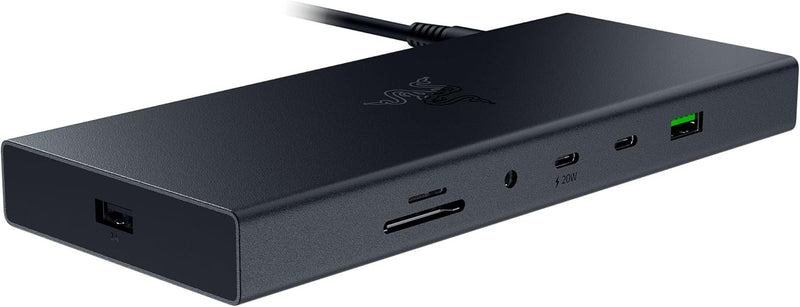
Razer RC21-02280100-R3U1 USB 4 Dock: 14 Ports, Dual 4K 120Hz
One USB 4 cable replaces your entire desk cable nest — 14 ports, dual 4K 120Hz displays, and 100W laptop charging from a single connection.
$174.50*$259.99Save 32%
View on Amazon
✓ In Stock on Amazon.com
*Price sourced from Amazon.com. Last updated:Oct 24, 2026.Price and availability are subject to change — details.
Affiliate Disclosure: As an Amazon Associate, Studio Supplies earns from qualifying purchases made through links on this page, at no additional cost to you. This helps support our editorial team.
Notice a mistake? Let Us Know
Overview
Key Features
ULTRA FAST USB 4 CONNECTIVITY — Discover the new USB standard for data transfer rates, display output support and device charging that is backward compatible with all the USB 2.0 & 3.0 devices
14 PORT DESIGN — From external HDDs and displays, to speakers and peripherals, free up PC ports and minimize cable clutter by running all devices through a single USB C connection
DUAL MONITOR SUPPORT — Create a display setup that offers the best of both worlds; experience stunning visuals on a primary display up to 4K 120 Hz and still have the space needed to multitask on a secondary monitor
ALWAYS ON LAPTOP CHARGING & POWER DELIVERY — Enjoy 100 W of charging for a laptop and connected devices with the included 180 W adapter; a dedicated power button enables powering down the dock for energy efficiency
DURABLE & LIGHTWEIGHT ALL METAL CASING — On top of its compact footprint and portable design, this dock is resistant to everyday wear and tear and ensures minimal heat buildup, making it ideal for extended use
WINDOWS & MAC COMPATIBLE — With tons of port connectivity for almost any device, the Razer USB 4 Dock is the perfect complement to both desktop setups and mobile workstations
Specifications
USB Standard
USB 4 (backward compatible with USB 2.0 & 3.0)
Total Ports
14
Port Types
USB Type-C, USB Type-A, HDMI, DisplayPort, Ethernet, SD, 3.5mm
Primary Display
Up to 4K 120Hz
Dual Monitor Support
Yes
Laptop Charging (PD)
100W
Included Power Adapter
180W
Casing
All-metal
OS Compatibility
Windows & Mac
Color
Black
Model
RC21-02280100-R3U1
Brand
Razer
Frequently Asked Questions
What actual bandwidth does USB 4 provide, and does this dock take full advantage of it?
USB 4 delivers up to 40 Gbps of total bandwidth — double what Thunderbolt 3 and USB 3.2 Gen 2x2 offer. The Razer dock uses that headroom to run dual monitors, high-speed storage, and device charging simultaneously without the bottlenecks you'd hit trying to do the same through a USB 3.2 hub. The practical limit is sharing that 40 Gbps pool across all active ports, so bandwidth-hungry devices running in parallel will split the pipe.
Is this dock compatible with Thunderbolt 3 and Thunderbolt 4 laptops, or only USB 4 hosts?
USB 4 is backward compatible with USB 2.0 and 3.0 devices on the peripheral side, but the host connection requires a USB 4 or Thunderbolt 3/4 port on your laptop to unlock full bandwidth and dual-monitor support. Connecting via a USB 3.2 port will work at reduced capability — you may lose one display output or see lower transfer speeds depending on the host controller.
Can it actually drive two 4K 120Hz monitors simultaneously, or does one display run at reduced resolution/refresh?
The primary display supports up to 4K at 120Hz; the secondary display spec should be verified against your specific host and cable combination, as dual 4K 120Hz simultaneously places significant demands on the USB 4 bandwidth budget. For most desktop publishing, video editing, and productivity workflows, the dual-monitor configuration performs without issue — competitive gaming at max refresh on both screens simultaneously is the edge case to test before committing.
What does the 100W power delivery mean for my specific laptop?
100W PD is sufficient to charge most 13- and 15-inch laptops at full speed while the dock is under load. Some high-performance 16-inch laptops with discrete GPUs require 130W or more to maintain battery level during heavy use — in those cases the dock will slow charge or maintain (not grow) battery percentage. The included 180W power adapter provides enough headroom for the dock itself plus the 100W delivery.
How many USB-A ports does the dock include, and at what speeds?
The dock's 14-port array includes USB Type-A ports alongside USB-C, HDMI, DisplayPort, Ethernet, SD card, and 3.5mm audio. Exact per-port speeds for each USB-A slot are documented in Razer's full spec sheet — for devices like external HDDs, the USB 4 host connection ensures the upstream bandwidth won't bottleneck USB 3.x attached storage.
Related Products


