

Toshiba
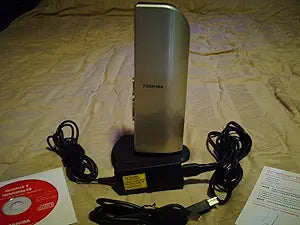
Toshiba PA3575U-1PRP Dynadock USB Docking Station
1920x1200
Simplify Your Workspace with a Universal Docking StationIntroducing the Toshiba Dynadock U, a universal USB docking station designed to declutter your desk and enhance productivity. Connect all your peripherals, monitors, and audio systems with a single USB cable. Compatible with virtually any Wi...
$82.68*
View on Amazon
✓ In Stock on Amazon.com
*Price sourced from Amazon.com. Last updated:Oct 23, 2026.Price and availability are subject to change — details.
Affiliate Disclosure: As an Amazon Associate, Studio Supplies earns from qualifying purchases made through links on this page, at no additional cost to you. This helps support our editorial team.
Notice a mistake? Let Us Know
Overview
Simplify Your Workspace with a Universal Docking Station
Introducing the Toshiba Dynadock U, a universal USB docking station designed to declutter your desk and enhance productivity. Connect all your peripherals, monitors, and audio systems with a single USB cable. Compatible with virtually any Windows-based PC with a USB 2.0 port, this sleek, space-saving dock provides quick access to your desktop environment, supporting up to three simultaneous displays and high-quality 7.1 surround sound.
- Universal Compatibility: Works with any Windows-based PC via USB 2.0.
- Space-Saving Design: Upright, slim design optimizes desktop space.
- Multi-Display Support: Connect a high-definition monitor and view up to three displays simultaneously.
- High-Quality Audio: Built-in digital card for 7.1 surround sound via the S/PDIF port.
- Multiple Ports: Includes six USB 2.0 ports (two with Sleep and Charge), Ethernet LAN, and 3.5mm audio jacks for headphones and microphones.
- Easy Undocking: Features an undock button for simple disconnection.
Key Features
One cable connection from your PC to all your devices
Universal compatibility with all Windows-based PCs including Vista 32- or 64-bit
Built-in HD Digital Video card supports up to 1920x1200 resolution
Built-in HD Digital Video card supports up to 1920x1200 resolution
Space-saving upright slim design reduces cable clutter
View up to three displays simultaneously
Hot swappable - add or remove most devices without rebooting the PC
Easily and safely undock with undock button
Specifications
Product Type
USB Docking Station
Video Card
Built-in HD Digital Video card
Max Resolution
1920x1200
Multi-display Support
Up to three displays simultaneously
Compatibility
All Windows-based PCs (including Vista 32/64-bit)
Design
Space-saving upright slim
Connectivity
One cable connection to PC
Features
Hot swappable, Undock button
Frequently Asked Questions
What kind of video resolution does the Toshiba Dynadock support?
The Toshiba Dynadock USB Docking Station features a built-in HD Digital Video card that supports resolutions up to 1920x1200.
Is this docking station compatible with all Windows PCs?
Yes, it offers universal compatibility with all Windows-based PCs, including both 32-bit and 64-bit versions of Vista.
Can I connect multiple monitors to this docking station?
Yes, the Toshiba Dynadock allows you to view up to three displays simultaneously, enhancing your multitasking capabilities.
Does this docking station help reduce cable clutter?
Yes, it is designed with a space-saving upright slim form factor that helps to reduce cable clutter by consolidating connections into a single cable to your PC.
Can I remove devices from the docking station without rebooting my computer?
Yes, the Dynadock is hot swappable, meaning you can add or remove most devices without needing to reboot your PC, and it includes an undock button for safe disconnection.
Related Products


