



TukeSM
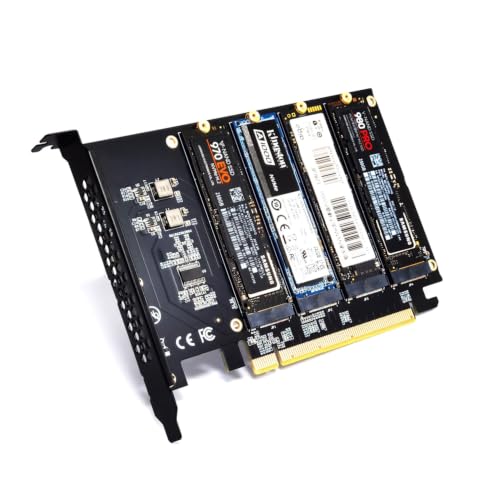
TukeSM PCIe 4.0 x16 Quad NVMe M.2 Adapter Card
Turn one PCIe 4.0 x16 slot into four NVMe M.2 drive bays on any motherboard that supports signal splitting
View price on Amazon
Affiliate Disclosure: As an Amazon Associate, Studio Supplies earns from qualifying purchases made through links on this page, at no additional cost to you. This helps support our editorial team.
Notice a mistake? Let Us Know
Overview
Key Features
Data transmission speed: full speed, chip: Y2211GG length: 16.7CM branch connector quantity: one to four, packaging list: adapter card, screwdriver, heat sink, type: adapter card
Product parameters, input interface: PCI-E X16 output interface: 4 * NVME M.2 (M-Key) support device: M.2 NVMe SSD hard disk, support system: WIN7, 8, 10, 11, Linux, Mac product accessories list, expansion card -----------------1PCS 1.0MM silicone gasket -----4PCS screw batch -----------------1PCS
Product description and characteristics, this product is suitable for the main board computer that supports PCI-E signal splitting, and can run 4 NVMe hard disks at the same time (no signal splitting main board can only run SSD1 interface disks); support 4 ports M.2 NVME protocol; PCI-E4.0 X16 backward compatible with PCI-E3.0; PCI-E X16 interface can improve the read and write performance of the hard disk, high-speed expansion transmission, so that the computer can give full play to its performance and improve the running speed; PCI-E X16 gold finger plating prevents surface oxidation, improves contact and conduction performance and improves service life;
Precautions, how to identify whether the computer main board has PCI-E signal splitting 1. At present, the main boards of various brands on the market such as ASUS, Ultramicro, MSI and other main boards: (X series: X99, X299, X399, X470, X570/Z590/B550) all support PCI-E signal splitting. You can check the specifications of the main board or consult the manufacturer to determine before purchasing;
2. If the existing main board is not clear, the most intuitive way is to check the information in the main board BIOS; (If the main board supports PCI-E splitting, you can usually find relevant options in the BIOS settings for configuration.
These options may be located in the "Advanced" or "Advanced Settings" section, and the specific location may vary depending on the main board model and BIOS version. In the BIOS interface, you can find options related to PCI-E splitting, which may include selecting the slot to split, the mode of splitting (e.g. x16 splitting into x8 + x8/x8 + x4 + x4/x4 + x4 + x4), etc. By adjusting these options, the splitting of PCIe lanes can be achieved to meet the needs of specific hardware).
Specifications
Brand
TukeSM
Type
Adapter card
Input Interface
PCI-E X16
Output Interface
4 x NVMe M.2 (M-Key)
Branch Connectors
One to four
Supported Device
M.2 NVMe SSD
PCI-E Standard
PCI-E 4.0 x16, backward compatible with 3.0
Chip
Y2211GG
Length
16.7 cm
Supported Systems
Windows 7/8/10/11, Linux, Mac
In the Box
Adapter card, screwdriver, heat sink, silicone gasket, screws
Frequently Asked Questions
Can this card run all four NVMe drives at the same time?
Only on a motherboard that supports PCI-E signal splitting (bifurcation). Without it, the card runs just the first M.2 slot's drive.
How do I know if my motherboard supports the signal splitting this card needs?
Check your board's specifications or its BIOS. TukeSM lists X99, X299, X399, X470, X570, Z590, and B550 as boards that commonly support PCI-E splitting.
Does this adapter card come with any SSDs included?
No. The title's "Without Hard Disk" note confirms drives are not included, so you'll need to supply your own M.2 NVMe (M-Key) SSDs separately.
Will this PCI-E 4.0 card work in an older PCI-E 3.0 slot?
Yes. The card is PCI-E 4.0 x16 rated and backward compatible with PCI-E 3.0, so it will fit and function in a 3.0 x16 slot.
What comes in the box for installation?
TukeSM includes the adapter card, a screwdriver, a heat sink, a silicone gasket, and mounting screws, covering the basic hardware needed to mount the card and drives.
Which operating systems does this adapter support?
It supports Windows 7, 8, 10, and 11, plus Linux and Mac, making it compatible with a wide range of desktop system setups.
Related Products


