
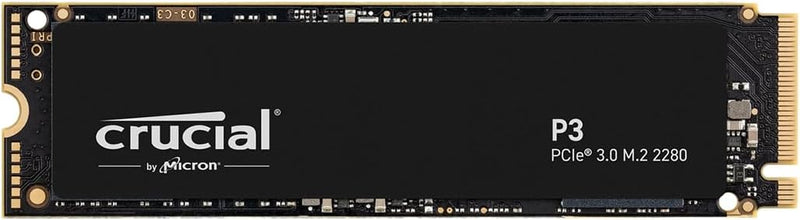


Crucial P3 NVMe SSD (Gen3 + P3 Plus Gen4, 500GB-4TB) — Editorial Review & Use Cases
The Crucial P3 family (CT500P3SSD8, CT1000P3SSD8, CT4000P3SSD8 — PCIe Gen3) and P3 Plus family (CT500P3PSSD8, CT1000P3PSSD8 — PCIe Gen4) are Crucial's mainstream M.2 NVMe SSD lines — designed for budget-conscious PC builds + laptops needing NVMe-class speeds without enthusiast-tier pricing. Per Crucial's official P3 Plus product page, the P3 hits up to 3,500 MB/s sequential read on Gen3 (the maximum the Gen3 interface allows); the P3 Plus pushes to 5,000 MB/s on Gen4 with the same QLC NAND + DRAM-less controller architecture.
What the P3 / P3 Plus Specifically Wins
- NVMe-class speeds at SATA-SSD price points — P3 ~$50-80 for 1TB, ~$150 for 4TB. Comparable speeds to mid-tier NVMe at substantially lower cost
- 3,500 MB/s sequential read (Gen3) / 5,000 MB/s (Gen4) — adequate for game loading, OS boot, application launch, content playback. The difference between 3,500 and 7,000 MB/s NVMe is rarely noticeable for typical workflows
- M.2 2280 form factor — fits standard M.2 NVMe slots on virtually all modern motherboards (Intel 8th-gen+, AMD Ryzen 1st-gen+) + laptops with M.2 slots
- 5-year warranty — Crucial / Micron standard
- Capacity ladder: 500GB / 1TB / 2TB / 4TB — the 4TB option is particularly compelling for large-game-library users + content creators
- Bootable without drivers on modern systems — Windows 10/11, macOS via NVMe driver (Mac Pro 2019 / Hackintosh), Linux 4.0+ all support NVMe natively
- Cool-running design — no aggressive sustained-load throttling at typical PC temperatures (vs some enthusiast NVMe that throttle without heatsinks)
Where the P3 / P3 Plus Specifically Fits
- Budget gaming PC builds — fast game loading at ~50% the cost of premium NVMe
- Mainstream desktop boot drives — Windows 11 + Office + Adobe + Steam library fits comfortably on 1-2TB
- Laptop NVMe upgrades — modern laptops with M.2 slot benefit from NVMe over SATA (faster boot, app load, less battery drain for I/O wait)
- Mass game / media library storage — 4TB P3 holds 50-80 modern AAA games or huge media collections
- Console expansion (PS5 / Xbox Series X) — when paired with the appropriate heatsink, P3 Plus meets PS5's 5,500 MB/s minimum (verify per-SKU)
- Light content creation workstations — adequate scratch drive for Lightroom + Photoshop + Premiere Pro / DaVinci Resolve at 1080p / light 4K
- Compact ITX / Mini-PC builds — single M.2 slot use, no SATA cable clutter
- Older PC upgrade path — Z270 / X370 motherboards with M.2 Gen3 slots see significant boot + app load improvement vs SATA SSD
- NUC / Mini PC builds — Intel NUC / ASUS PN / Beelink mini PCs typically use single M.2 NVMe slot
- Steam Deck expansion (P3 2230 form factor not available; standard P3 is 2280 — needs Steam Deck OLED's 2230 socket adapter)
Honest Limits Buyers Should Know
- QLC NAND — lower endurance than TLC. 220TBW on 1TB P3 vs 600TBW on Samsung 990 PRO (TLC) at the same capacity. For typical user workloads (boot drive + games + occasional photo edit), 220TBW lasts ~10 years; heavy daily-write workloads (video edit scratch, database) deplete it faster. NOT for write-heavy enterprise workloads
- DRAM-less design — sustained random writes throttle. Real-world: after the SLC cache (varies by capacity, typically 10-15% of total) fills, sustained writes drop to ~80-150 MB/s direct-to-QLC. For bursty workloads this is fine; for sustained large-file copies (transferring 500GB), expect significant slowdown after the first 50-100GB
- P3 caps at PCIe Gen3 speeds. Even on Gen4 motherboards, P3 only delivers ~3,500 MB/s. For full Gen4 speeds use P3 Plus or step up to Gen4-native SSDs (WD SN850X, Samsung 990 PRO)
- Not for PS5 without verification. PS5 requires 5,500 MB/s minimum + heatsink. Most P3 Plus 1TB SKUs meet the speed; verify the specific 4TB SKU + add heatsink (built-in PCB heatsinks not always sufficient)
- No hardware encryption. AES-256 / OPAL hardware encryption not supported. BitLocker + FileVault work via software-only encryption (slightly slower)
- 4K random IOPS lower than premium NVMe. P3 hits ~400K 4K read IOPS; WD SN850X / Samsung 990 PRO hit 1M+. For database / VM workloads this matters; for everyday use it doesn't
- Thermal throttling under sustained load. Long sustained writes (multi-hour video edit renders, bulk file transfers) trigger thermal throttling at ~70°C. Heatsink mitigates; most users don't hit this
- SLC cache size depends on capacity. Small SKUs (500GB) have small SLC cache; large SKUs (4TB) have substantial SLC cache. Higher capacities are markedly more performant under sustained writes
Where Buyers Should Look Elsewhere
- Premium / enthusiast tier (sustained write performance) → WD Black SN850X, Samsung 990 PRO, Crucial T700 (Gen5)
- Mid-tier balance (TLC + DRAM) → WD Black SN770, Samsung 970 EVO Plus, Kingston KC3000
- Storage-only secondary (cheaper) → Crucial P3 (Gen3) instead of P3 Plus when boot drive is separate
- PS5 expansion → WD Black SN850P (PS5-certified), Samsung 990 PRO with heatsink
- Enterprise / 24/7 write-heavy → Samsung PM893 / Intel D7 / Micron 7400 PRO datacenter SSDs
- Steam Deck (2230 form factor) → WD SN770M, Sabrent Rocket 2230, Crucial T705 2230 — verify Steam Deck compatibility
- Cheaper SATA-class (if NVMe slot not available) → Crucial MX500 (TLC) or BX500 (QLC)
Sources & Citations
- Crucial, "P3 Plus NVMe SSD product page," crucial.com (accessed 2026-05-18)
- Tom's Hardware, "Crucial P3 / P3 Plus review and NVMe SSD comparison," tomshardware.com (accessed 2026-05-18)
- AnandTech, "NVMe SSD reviews and benchmark coverage," anandtech.com (accessed 2026-05-18)
- TechPowerUp, "Crucial P3 / P3 Plus reviews," techpowerup.com (accessed 2026-05-18)
Last verified: 2026-05-18


